
If you pay bills in BCV Mobile
For paper QR bills, simply scan the QR code using the app’s scan feature and confirm your payment.
For QR bills received as a PDF (e.g., via email), open the bill on your smartphone, tap the “Share” or “Send to” icon, and select BCV Mobile.
If you pay bills in BCV-net
You can either upload your QR bills in PDF or image format (.png, .jpg, .jpeg, or .bmp) or scan the QR code in BCV-net, for example with a dedicated QR code reader. Then simply enter any additional payment information, if needed, and your bill is ready to be paid.
Alternatively, you can manually enter the payment data that appear on the QR bill:
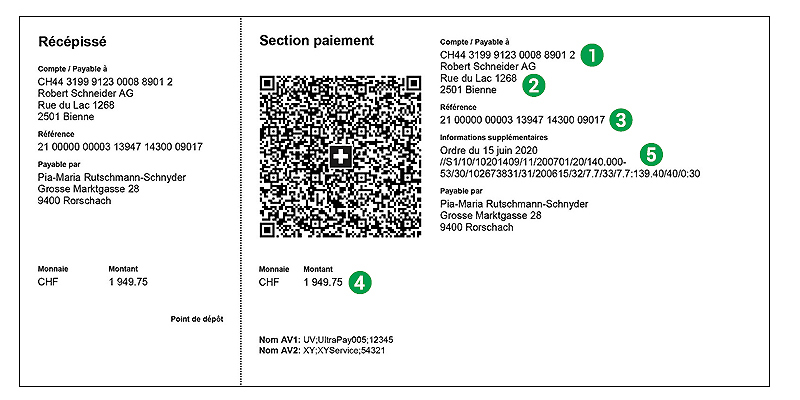
- the IBAN (21 characters)
- the beneficiary's name and address
- the reference number, if provided
- the payment amount
- any additional information provided (i.e., message to beneficiary)
If you use standing orders to pay recurring bills
- Scan the QR code on your bill, then click on “Continue.Check the information that appears in the payment fields.
- Then click on “Other options” at the bottom of the screen.
- Select “Standing order,” and then set the frequency, payment day, and other payment date parameters as needed.
- Click on “Close” in the top right corner to return to the payment screen, and then on “Confirm” to confirm the new standing order.
If you use eBill
- When you confirm an invoice, eBill automatically retrieves the payment data sent by the invoice issuer.
If you use bill payment software
- Scan your QR bills with an optical reader or manually enter them into your payment software, then send them as one payment file to BCV.
If you use paper payment orders
If you mail your invoice payments to BCV, you can also pay your QR bills this way. Simply detach the payment section of the bill and attach it to your payment order.
Special Conditions Applicable to Payment Processing
File size : 256 KB - Last update: 08.01.2025


