
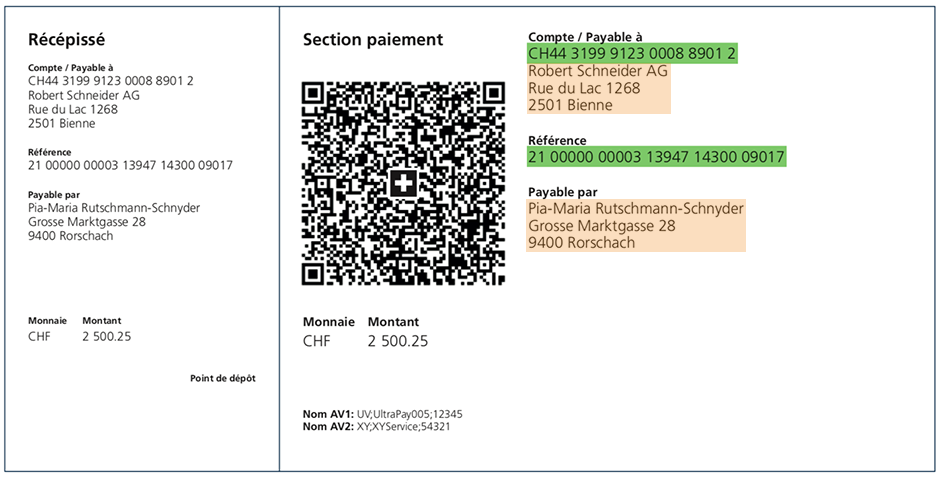
1) Your QR slips contain your QR-IBAN and QR reference information.
This format requires billing software and a QR-IBAN. If you don’t have a QR-IBAN, ask your BCV advisor.
When creating a bill with a QR-IBAN, you must enter a QR reference number. This allows your software to automatically reconcile the payment data.
Please note: starting in November 2025, addresses on QR bills must follow a standard format.

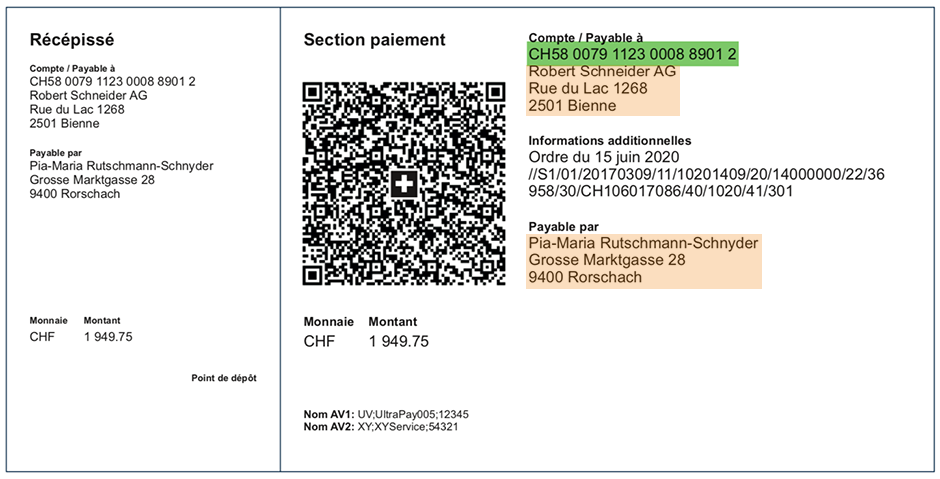
Please note: starting in November 2025, addresses on QR bills must follow a standard format.

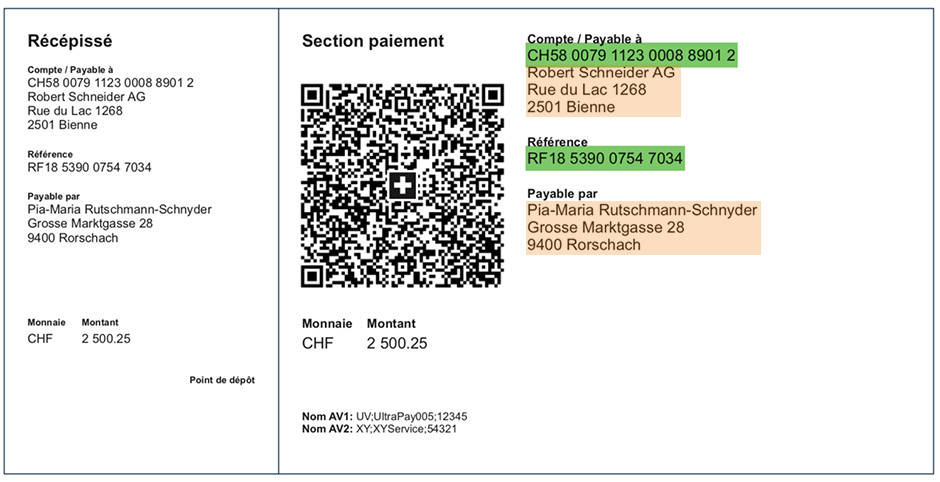
3) If you usually include a SCOR (Creditor Reference) number on your bills, your QR slips contain both your IBAN and SCOR.
The new QR bills are designed to meet the Swiss payment standards criteria.
Please note: starting in November 2025, addresses on QR bills must follow a standard format.

- You can generate QR bills yourself and print them in black and white on perforated white paper.
- You can create QR bills easily with your accounting software or with the QR generator in BCV-net (IBAN-only option).
- QR bills can be issued in CHF or EUR.
- You can add extra information for the bill recipient to your QR bills, such as a reference number, to make them easier to process.
- Because QR bills contain more detailed information in the QR code and require the use of an IBAN, they’re more secure than other payment methods.
- There are fewer data-processing errors with QR bills, as the payment data contained in the QR code is retrieved digitally when the customer makes a payment (by mobile phone, with an optical reader, or at a Swiss post office).

Check out our quick guide:
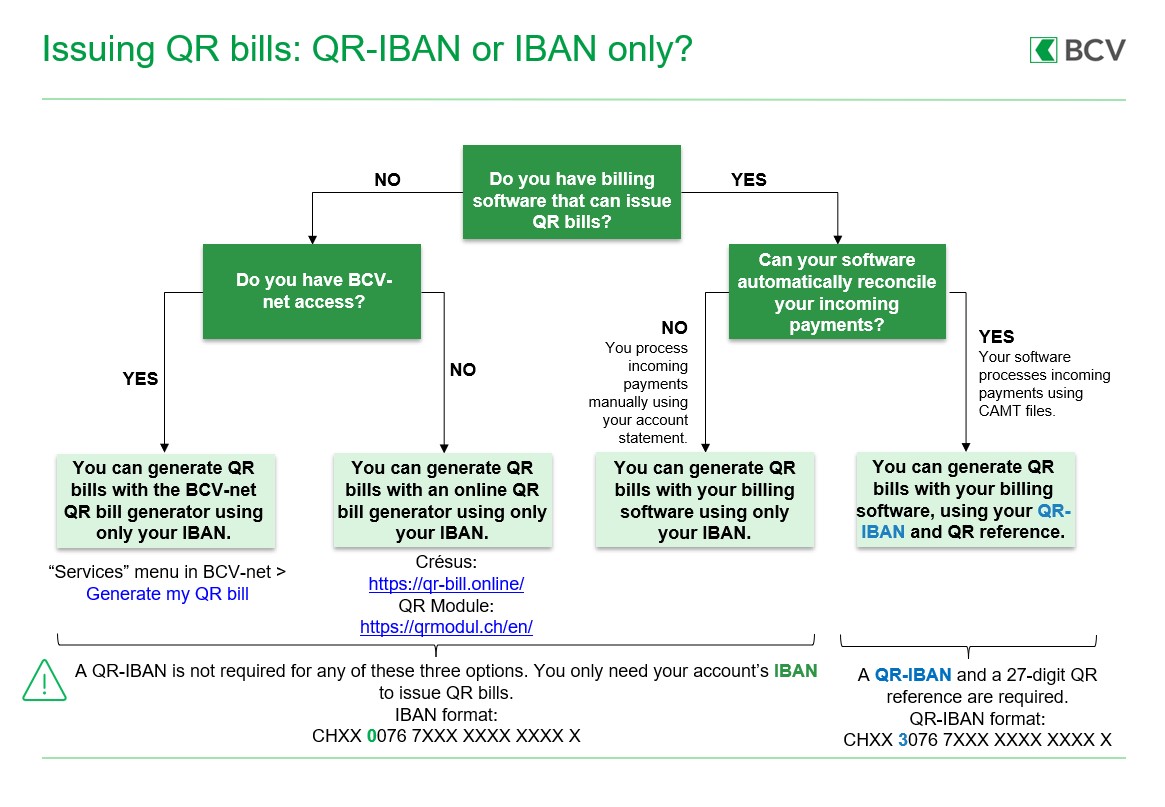
1) I generate my QR bills using billing and accounting software
If your software can reconcile payment data by importing CAMT files, then you should issue QR bills using a QR-IBAN. Your incoming payments will be recorded as grouped transactions, with the individual payment details contained in the CAMT file. This allows your software to automatically reconcile your accounts. To use this format, you should first make sure that CAMT messages are activated in BCV-net (Preferences > CAMT-ISO) or in BCV-connect.
If your software does not process CAMT files, you should issue QR bills using an IBAN only. With this format, each incoming payment will be booked as a separate transaction in your account, and you will have to reconcile your accounts manually.
2) I want to issue QR bills but I don’t have accounting or billing software
Our QR-generator tool on BCV-net is a quick and easy way of generating bills using only an IBAN. You can also upload a file to generate up to 50 bills at once, and either print them on perforated white A4 paper or send them electronically.
There are also other online QR-generators on the market, like Crésus and QR Module.
No, you are responsible for managing your own billing. You can use the QR-generator available on BCV-net or another online QR-generator like Crésus or QR Module, and then print your bills on perforated white paper. If you issue bills for electronic payment (e-banking or mobile banking), you can send them to your customers by email in PDF format.
If you are not able to generate QR bills, you can invoice using only your IBAN.
No, you can purchase the paper from the supplier of your choice.
Official specifications are available on the SIX website.
Please also note the following:
- The name of the company that appears on the QR bill must match the name on the account to be credited; the same is true for the QR-IBAN numbers. If this information does not match, your payments could be rejected.
- It is recommended that you enter all the payment data on the QR bill, so that your payments will be processed completely automatically. The payer can only write in the following fields: name and address of the bill recipient (under “Payable by”) and the payment amount. However, writing in this information will add a processing fee (for example, when paying bills at a Swiss post office).
- The payer cannot add a message to the payee.
You are responsible for managing your QR bills. Unlike with BVR payment slips, you do not need to test your QR bills with us first.
If you wish to test out your QR bills, you can:
- check your QR code on the Swiss financial industry’s validation portal
- for more security, generate a test QR bill and check that it can be scanned in BCV Mobile or paid in person at the post office.
No. Depending on your situation, there are two main options:
- If you use accounting software that can automatically process incoming payment data via CAMT files, you can generate your QR bills with a QR-IBAN.
- If you issue a limited number of invoices or don’t use accounting software that can process CAMT incoming payment files, you can generate your QR bills using an IBAN only.
You can find more information above, under “Which format should I use for my QR bills?”
The payment data, including the value date, creditor account, and the QR-IBAN, are available in the following formats:
- camt.053: account statement (daily, weekly, monthly)
- camt.054: QR-IBAN/BVR payment advice
By default, payments are booked to your account twice daily (at 12 noon and 8pm) as grouped transactions, and the corresponding QR payment data are sent to you in a camt.054 file the following morning.
Alternatively, you can request one of the following options to speed up customer payment processing, as well as your own account reconciliation and order processing:
- Twice daily camt.054 delivery
With this option, you also receive an initial camt.054 file after the noon payment booking. - camt.054 delivery on your schedule
With this option, you can choose when payments are booked to your account and when you receive camt.054 files (between the hours of 6am and 7pm).
Special conditions applicable to payment processing
File size : 256 KB - Last update: 08.01.2025
File also available in: Allemand
Which format should I use for my QR bills? (In French only)
File size : 72 KB - Last update: 22.11.2023